Quick Start
This walkthrough stands up a minimal working two-node cluster and configures three routes: dropping an unwanted tracker domain, bypassing local subnets, and forwarding selected domains through a remote regional exit node.
Replace master-1.example.com and exit-1.example.com with your actual server hostnames, each pointing to its server’s IP in DNS. (Need a closed deployment with no public master? Jump to Headless Ansible Deployment.)
Example Topology
[edge client] ──────► master-1.example.com:443 (master + edge + exit)
                              │
              ┌───────────────┼───────────────┐
              ▼               ▼               ▼
         drop (reject)  localhost (direct) exit-1.example.com:443
                                               │
                                               ▼
                                           [internet]
| Node | Roles | Address |
|---|---|---|
master-1 | master, edge, exit | master-1.example.com:443 |
exit-1 | exit | exit-1.example.com:443 |
localhost | built-in pseudo-peer | — |
drop | built-in pseudo-peer | — |
master-1 combines master, edge, and exit on port 443 so both the control plane and data plane share a single TLS listener without opening extra firewall ports.
Install Packages
Install the server package on both hosts and the desktop admin client on your workstation (details in the Installation Guide):
# On master-1 and exit-1
curl -fsSL https://repo.ololo.tech/setup.sh | sudo sh
sudo apt install ololo-relay      # Debian / Ubuntu
sudo dnf install ololo-relay      # Fedora / RedOS

# On the admin workstation
sudo apt install ololo-relay-admin
sudo dnf install ololo-relay-admin
TLS Certificates
Both servers listen on 443/tcp and require valid TLS certificates. If you already use corporate CA or wildcard certificates, point cert_file and key_file to them and skip ahead.
For Let’s Encrypt, run certbot in standalone mode (port 80/tcp must be reachable while certbot runs):
# On each server
sudo apt install certbot          # Debian / Ubuntu
sudo dnf install certbot          # Fedora / RedOS

# On master-1
sudo certbot certonly --standalone -d master-1.example.com

# On exit-1
sudo certbot certonly --standalone -d exit-1.example.com

sudo systemctl enable --now certbot.timer
Certificate File Permissions
Let’s Encrypt restricts /etc/letsencrypt/archive/ to root (0600). Because ololo-relay runs as the unprivileged ololo-relay user, grant read access via POSIX ACLs:
sudo apt install acl          # Debian / Ubuntu (if not installed)
sudo dnf install acl          # Fedora / RedOS

sudo setfacl -R -m u:ololo-relay:rX /etc/letsencrypt/live/
sudo setfacl -R -m u:ololo-relay:rX /etc/letsencrypt/archive/
sudo getfacl /etc/letsencrypt/archive/   # verify user:ololo-relay:r-x
Renewal Hook
On SIGHUP, ololo-relay hot-reloads certificates from disk without dropping active streams:
cat | sudo tee /etc/letsencrypt/renewal-hooks/deploy/reload-ololo.sh <<'EOF'
#!/bin/sh
systemctl reload ololo-relay
EOF
sudo chmod +x /etc/letsencrypt/renewal-hooks/deploy/reload-ololo.sh
Configure master-1
Generate the Bootstrap Admin Token
Generate a 32-byte random base64url token and its SHA-256 digest on any machine with openssl:
MASTER1_TOKEN=$(openssl rand 32 | base64 | tr '+/' '-_' | tr -d '=\n')
echo "Admin token (save securely):"
echo "$MASTER1_TOKEN"

MASTER1_HASH=$(printf '%s' "$MASTER1_TOKEN" | sha256sum | awk '{print $1}')
echo "SHA-256: $MASTER1_HASH"
Initial Policy (initial-policy.yaml)
Loaded only once on cold start when the bbolt database is empty; subsequent restarts read state from policy.bbolt:
sudo nano /etc/ololo-relay/initial-policy.yaml
version: 1

peers:
  - id: master-1
    kind: server
    admin: true
    roles:
      master: true
      edge: true
      exit: true
    addrs: ["master-1.example.com:443"]
    token_sha256: "PASTE_MASTER1_HASH_HERE"
    tun_address: "100.64.0.1/32"
    tun_mtu: 1420
    exit_listen: "0.0.0.0:443"
    camouflage:
      mode: embedded

routes: []

default:
  mode: relay
  peers: ["master-1"]
Node Configuration (node.yaml)
sudo nano /etc/ololo-relay/node.yaml
node:
  id: master-1
  data_dir: /var/lib/ololo-relay

master:
  data_file: /var/lib/ololo-relay/policy.bbolt
  initial_policy_file: /etc/ololo-relay/initial-policy.yaml

edge:
  tun:
    name: ololo0

exit:
  tls:
    cert_file: /etc/letsencrypt/live/master-1.example.com/fullchain.pem
    key_file:  /etc/letsencrypt/live/master-1.example.com/privkey.pem
Start the service and verify startup logs:
sudo systemctl enable --now ololo-relay
sudo journalctl -u ololo-relay -f
Connect the Desktop Admin Client
Launch ololo-relay-admin, click + in the top cluster bar, and fill in the connection settings:
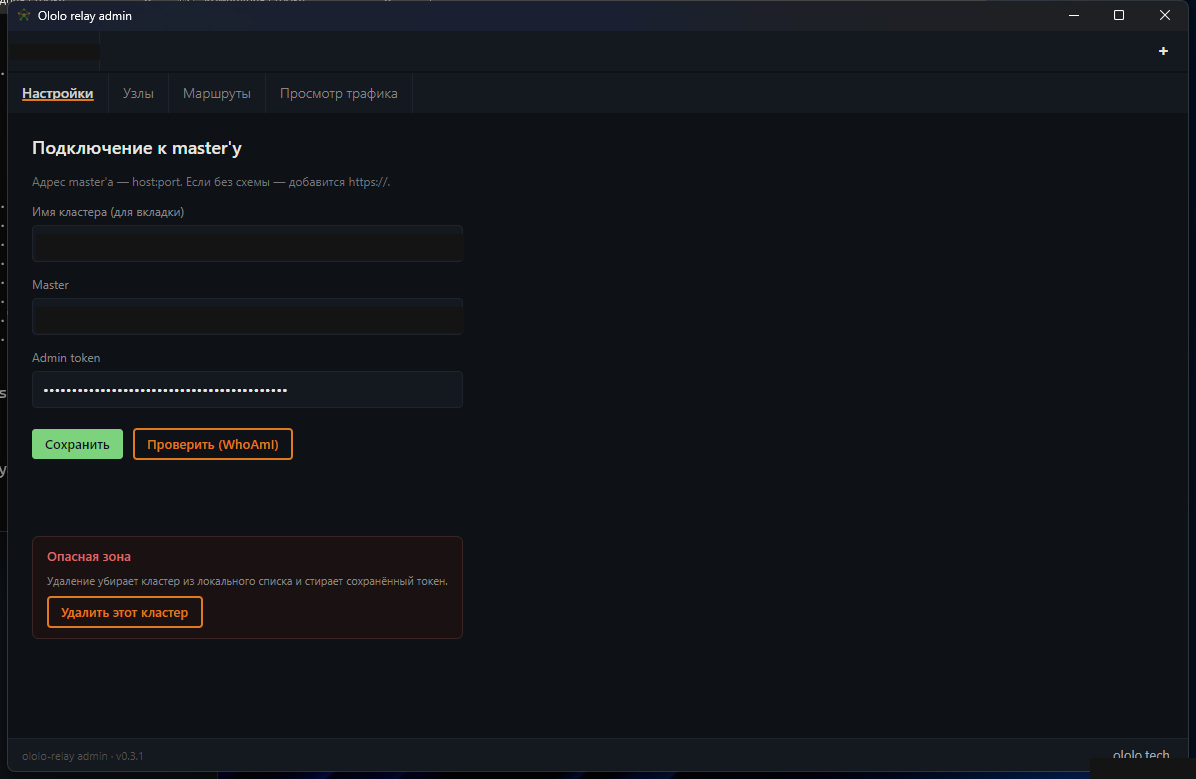
| Field | Value |
|---|---|
| Cluster name | home-relay (display label) |
| Master | master-1.example.com:443 |
| Admin token | MASTER1_TOKEN generated above |
Click Save, then Verify (WhoAmI) to confirm connectivity and admin privileges.
Inspect Nodes
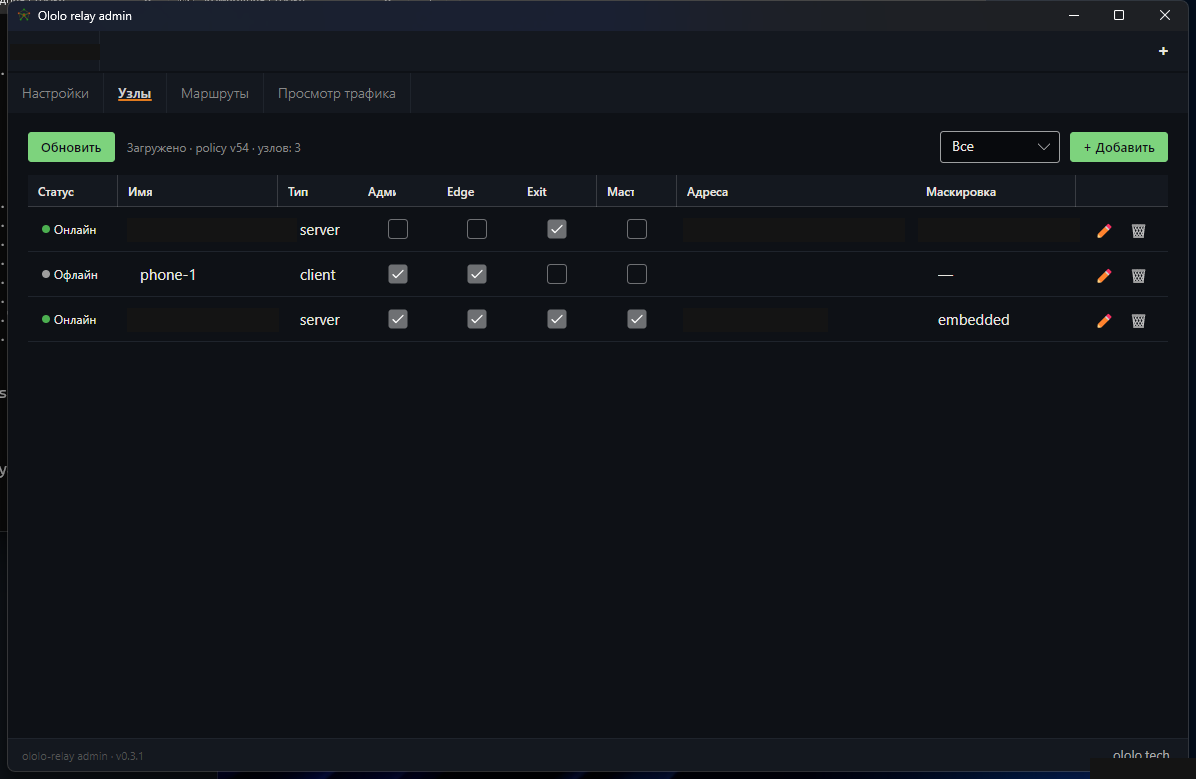
Open the Nodes tab — master-1 appears online with Master, Edge, and Exit roles:
Register the Regional Exit Node (exit-1)
Register exit-1 in the desktop GUI (Nodes → + Add: ID exit-1, kind server, role Exit, address exit-1.example.com:443, exit_listen: 0.0.0.0:443, HTTP response mode embedded), then copy the one-time master_token shown in the confirmation banner (if lost later, rotate the token from the node details drawer) and configure /etc/ololo-relay/node.yaml on exit-1:
node:
  id: exit-1
  data_dir: /var/lib/ololo-relay
  master_token: "<GENERATED_EXIT1_TOKEN>"

masters:
  - addr: master-1.example.com:443

exit:
  tls:
    cert_file: /etc/letsencrypt/live/exit-1.example.com/fullchain.pem
    key_file:  /etc/letsencrypt/live/exit-1.example.com/privkey.pem
sudo systemctl enable --now ololo-relay
exit-1 connects to master-1 and flips to Online in the Nodes table.
Configure Routes
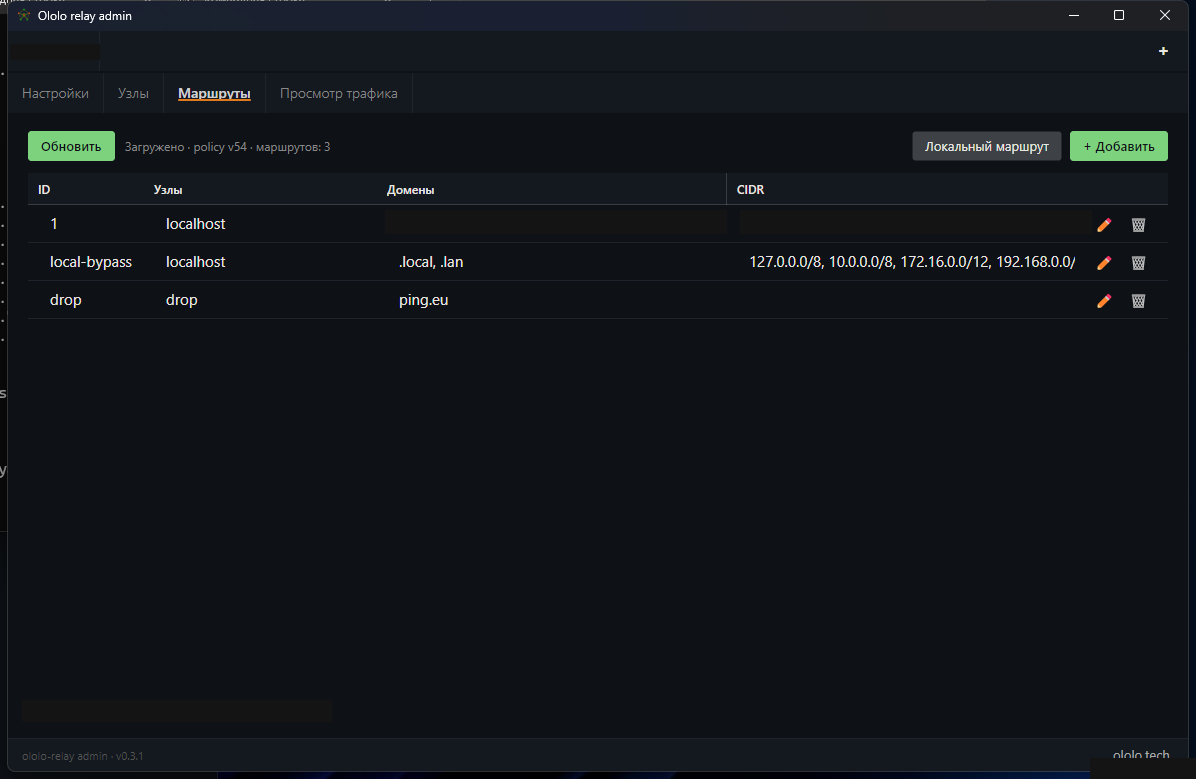
Open the Routes tab. If local-bypass (.local, .lan, RFC 1918 → direct) is not present yet, click Local route to add it in one click:
Drop Route (Telemetry / Unwanted Domains)
Click + Route to reject unwanted telemetry or ad domains at the gateway:
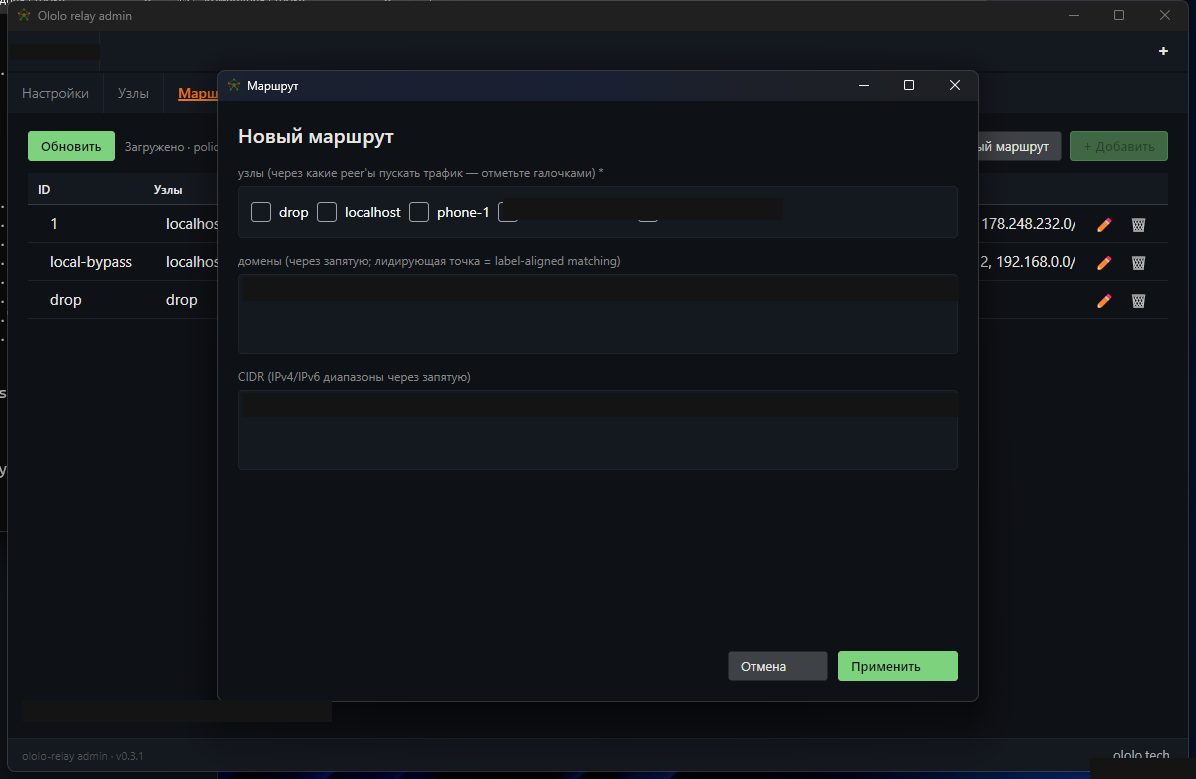
- Peers —
drop - Domains — e.g.
.ads-tracker.test, spy-analytics.test
Regional Exit Route
Add another route pointing selected domains or CIDRs through exit-1:
- Peers —
exit-1 - Domains — e.g.
.staging-eu.example.org
Policy changes propagate immediately to all connected nodes (WatchPolicy).
Verify
From a client behind master-1:
# Confirm egress IP matches exit-1 for routed destinations
curl -s https://ifconfig.me

# Confirm dropped telemetry domains fail immediately
curl -v https://ads-tracker.test 2>&1 | grep -E "Failed|refused|dropped"
Live routing decisions can be inspected in real time under the Traffic View tab in ololo-relay-admin.